60+ Digital Product Ideas to Sell in 2026

The highest-probability digital product formats for most creators are mini-courses, templates and tools, ebooks and workbooks, membership subscriptions, niche SaaS or plugins, and asset packs. The one rule that cuts through the noise: choose the smallest product that reliably delivers the one outcome your audience already pays for. Start there, validate it fast, and scale later.
Here is why that rule works. Most creators overbuild. They spend months on a 40-module course when a 90-minute workshop covering the single hardest step would convert better and ship in two weeks. Salesforce’s commerce research confirms the core appeal: digital products are intangible, delivered electronically, require no inventory, and carry margins that physical goods simply cannot match. Profitomics applies this same logic to financial education, packaging step-by-step ebook guides with templates and checklists so buyers get a result, not just reading material.
- Mini-courses and workshops: High perceived value, fast to build, strong conversion when the outcome is specific.
- Templates and tools: Lowest effort to create, easiest to validate, excellent for list-building.
- Ebooks and workbooks: Proven format, works on every platform, pairs well with templates.
- Membership and subscription: Recurring revenue, but requires consistent content output.
- Niche SaaS and plugins: Highest income ceiling, highest technical barrier.
- Asset packs: Passive once built; discovery depends heavily on marketplace placement.
Key Takeaways
The most reliable path to digital product income is to choose the smallest format that delivers one clear outcome, validate it with real buyers before building, and market it through owned channels before spending on ads.
| Point | Details |
|---|---|
| Start with the smallest viable format | Templates, short ebooks, and prompt packs launch fastest and validate demand with the least risk. |
| Validate before you build | A landing page presale or paid beta with 5+ buyers is the green light to build the full product. |
| Price on value, not effort | A $97 template that saves a buyer four hours of work is priced correctly; $9 is not. |
| Own your distribution | An email list of 1,000 engaged subscribers outperforms 10,000 passive social followers at launch. |
| Profitomics accelerates the process | The Passive Income Blueprint includes launch checklists and spreadsheets to move from idea to first sale faster. |
Table of Contents
- What counts as a digital product?
- Why selling digital products makes financial sense
- Where to sell: platforms and how to choose
- 60+ digital product ideas organized by category and effort
- How to validate a digital product idea fast
- How to create and launch: from MVP to first 100 customers
- Pricing and monetization models
- How to market and distribute digital products
- Essential tools to build, host, sell, and deliver
- What success actually looks like: realistic outcomes
- Your 6-week launch checklist
- Where to start if you only have 10 hours a week
- Profitomics gives you the framework, not just the idea
- Sources
What counts as a digital product?
A digital product is an intangible good sold and delivered electronically with no physical inventory, no shipping cost, and no practical limit on how many copies you can sell. One file, sold ten thousand times, costs the same to produce as one sold once.
Concrete examples span a wide range:
- Learning products: Ebooks, online courses, mini-courses, workshops, webinars
- Templates and tools: Notion templates, spreadsheets, calculators, resume templates, pitch decks
- Memberships: Subscription access to content libraries, communities, or ongoing coaching
- Software and plugins: SaaS tools, WordPress plugins, browser extensions, no-code apps
- Stock assets: Photos, icons, fonts, video clips, music loops, 3D models
- Emerging formats: AI prompt packs, automation setups, GPT-based tools, digital art collections
One distinction worth making: a course is a structured learning sequence (usually multi-module), a mini-course is a focused 60–120 minute experience targeting one outcome, and a coaching session is live, one-to-one, and not a digital product in the scalable sense. The first two scale; the third does not.
Why selling digital products makes financial sense
The economics are hard to argue with. An ebook sold with a high margin and good monthly sales volume can generate substantial net income, potentially exceeding typical freelance retainers at double the gross revenue. Online education worldwide continues to show strong global demand, and that demand is not limited to courses. Templates, asset packs, and prompt libraries all benefit from the same structural advantages.
Advantages:
- Margins of 70–95% after platform fees, compared to 20–50% for physical goods
- Infinite inventory: no restocking, no fulfillment delays, no warehouse
- Global reach from day one, with no additional distribution cost
- Leverage of existing expertise: what you already know has market value
- Scalable recurring revenue when packaged as a subscription or membership
Tradeoffs and risks:
- Discovery requires real marketing effort, especially off-platform
- Refund rates can spike if the product does not deliver a clear, promised outcome
- Intellectual property theft is a genuine risk for high-value assets
- Saturation in broad niches (generic productivity templates, generic fitness guides) makes differentiation harder
| Pros | Cons |
|---|---|
| High margins, no inventory | Requires sustained marketing effort |
| Scalable globally | Refund risk if outcome is unclear |
| Leverage existing knowledge | IP protection is your responsibility |
| Recurring revenue potential | Broad niches are crowded |
Getting started costs less than most people expect. A basic ebook or template pack can be produced for under $100 in tools and launched in two to four weeks. A mini-course typically runs $200–$500 in production costs (screen recording software, a simple landing page, an email provider) and four to eight weeks of part-time work.
Pro Tip: Before you build anything, write one sentence that names who the product is for, the specific outcome it delivers, and the obstacle it removes. If you cannot write that sentence clearly, the product is not ready to build.
Where to sell: platforms and how to choose
Platform choice shapes your margin, your audience, and how much marketing you need to do yourself. The core tradeoff is discovery versus control: marketplaces bring built-in traffic but take a cut and own the customer relationship; your own store gives you full margin and customer data but requires you to drive every visitor.
Platform types and their fit:
Creators validate demand by researching marketplaces like Amazon KDP, Etsy, and Gumroad before building, because those platforms surface real buyer behavior. That research step is worth doing even if you ultimately sell from your own site.
Decision rule: If you have no audience yet, start on a marketplace (Gumroad, Etsy, or Amazon KDP) to get discovery. Once you have 500+ email subscribers or consistent monthly sales, migrate to or add a Shopify store or Teachable account to own the relationship and improve margins.
Checklist before you pick a platform:
- Does the platform support your file type and delivery method?
- What are the transaction fees and payout schedules?
- Can you collect customer email addresses?
- Does it support licensing terms you need (single use, commercial, extended)?
- What is the refund policy, and who controls it?
60+ digital product ideas organized by category and effort
The list below is organized by category, with an effort label (low/medium/high) and a brief use case note for each group. Use it as a starting point, not a final answer. Adventures in Products makes the case that niching down and bundling assets outperforms broad offerings almost every time.
Learning and education (medium to high effort, high demand)
- Online mini-course on a single skill (e.g., Excel for freelancers, cold email writing, Canva for small business)
- Full video course with modules and quizzes
- Workshop recording sold as an on-demand product
- Webinar replay bundle
- Study guides and exam prep packs (CPA, real estate license, IELTS)
- Language learning audio packs with transcripts
- Parenting or child development guides
- Fitness and nutrition programs with meal plans
- Personal finance literacy course for beginners
- Investing fundamentals course (stocks, index funds, crypto basics)
- Coding bootcamp in a box (beginner Python, JavaScript)
- Niche skill workshop (pottery, watercolor, calligraphy)
Effort label: Medium to high. Expect 4–12 weeks for a quality course. Mini-courses (one outcome, 60–90 minutes) cut that to 2–4 weeks.
Productivity and business tooling (low to medium effort, strong demand)
Notion templates, spreadsheets, and small automation products are among the easiest digital goods to launch with limited time, and they build email lists reliably when offered as lead magnets.
- Notion workspace templates (project management, content calendar, CRM)
- Google Sheets financial trackers (budget, net worth, debt payoff)
- Excel calculators (mortgage, investment return, pricing calculator)
- Business plan template with guided prompts
- Freelance contract and proposal templates
- Invoice and client onboarding templates
- Standard operating procedure (SOP) template packs
- Hiring and interview scorecard templates
- Social media content calendar templates
- Email newsletter planning templates
- Pitch deck templates (Canva, PowerPoint, Google Slides)
- Airtable base templates for agencies
Effort label: Low to medium. A well-designed Notion template can be built in a weekend. A full spreadsheet calculator suite takes one to two weeks.
Creative assets (low to medium effort, passive income potential)
Digital assets including licensed art and asset packs represent a measurable market category for creators. Stock photography, icon sets, and design templates are the most accessible entry points.
- Stock photography packs (lifestyle, business, food, travel)
- Icon sets and UI kits
- Canva template packs (social media, presentations, resumes)
- Procreate brush packs
- Lightroom and Capture One preset packs
- Font bundles
- Logo template kits
- Video intro and outro templates (After Effects, CapCut)
- AI-generated art packs (for commercial use, licensed properly)
- 3D model packs for product mockups
- Texture and pattern libraries
- Motion graphics templates
Effort label: Low to medium per asset; high if building a comprehensive library. Shutterstock and Etsy are the primary discovery channels.
Content and marketing assets (low effort, high utility)
- Email swipe file collections (cold outreach, nurture sequences, launch emails)
- Social media caption packs by niche
- Blog post templates and content brief frameworks
- SEO keyword research spreadsheets by niche
- YouTube video script templates
- Podcast episode planning templates
- PR pitch templates
- Ad copy swipe files (Facebook, Google, LinkedIn)
- Content repurposing checklists
- Brand voice and style guide templates
Effort label: Low. Most of these can be assembled from existing work in one to two weeks.
Memberships and subscriptions (medium to high effort, recurring revenue)
- Monthly template subscription (new Canva or Notion templates each month)
- Private community with weekly content drops
- Stock asset subscription (photos, icons, video clips)
- Newsletter with paid tier (analysis, curated resources, tools)
- Coaching membership with group calls and resource library
- Niche research subscription (weekly market reports, trend analysis)
Effort label: Medium to high to set up; ongoing commitment to maintain. Best for creators who already have an audience.
Micro-SaaS and no-code tools (high effort, high ceiling)
- Chrome extension for productivity or research
- WordPress plugin for a specific workflow
- Zapier or Make automation templates
- Bubble or Glide no-code app for a niche workflow
- API wrapper tool for a specific use case
- GPT-based custom assistant or chatbot
Effort label: High. Expect 4–16 weeks depending on complexity. Revenue ceiling is the highest of any category.
Printables and planners (low effort, high volume potential)
- Daily, weekly, and monthly planner pages
- Budget and savings tracker printables
- Habit tracker sheets
- Wedding planning printables
- Kids’ activity and learning sheets
- Gratitude journal pages
- Meal planning and grocery list printables
- Business goal-setting worksheets
Effort label: Low. Etsy and Gumroad are the primary channels. A single well-designed planner can generate passive sales for years.
Niche guides and localized content (low to medium effort)
- City or regional travel guides (PDF or digital flipbook)
- Neighborhood restaurant and activity guides
- Niche hobby guides (van life setup, urban gardening, home brewing)
- Industry-specific compliance checklists
- Relocation guides for specific cities or countries
- Pet care guides by breed or condition
Effort label: Low to medium. Niche specificity is the moat here. A generic travel guide competes with free content; a guide to “best coffee shops for remote workers in Austin” does not.
Prompt packs and automation setups (low to medium effort, growing demand)
- ChatGPT prompt packs by profession (marketers, lawyers, coaches, developers)
- Midjourney prompt libraries by style or use case
- Claude or Gemini workflow templates
- Make or Zapier automation blueprints
- Notion AI workflow setups
- Custom GPT configurations for specific business functions
Effort label: Low to medium. This category is growing fast and has low competition relative to demand in most niches.
How to validate a digital product idea fast
Validation before building is the single habit that separates creators who make money from those who make products. The goal is to find evidence that real people will pay for your specific idea before you invest weeks of production time.
Nick Sasaki’s review-mining method is the most systematic approach available: mine competitor reviews on Amazon, Etsy, Gumroad, and Udemy; identify recurring pain gaps (what buyers wish the product had done better); then design the smallest product that closes that gap. AI tools like ChatGPT accelerate pattern detection across hundreds of reviews in minutes.
-
Landing page presale test. Build a one-page site describing the product and its outcome. Drive 200–500 visitors via a small paid ad budget ($50–$150 on Meta or Google) or a social post to a relevant community. A 2–5% conversion to email signup signals interest; a 1–3% conversion to a presale purchase (even at a discount) is strong validation. If you get below 0.5% on either, the positioning or the audience is wrong.
-
Review-mining and pain-gap research. Search Amazon KDP, Etsy, and Udemy for products in your niche. Read the 3-star and 4-star reviews — not the 1-star complaints, which are often outliers, and not the 5-star praise, which tells you nothing about gaps. The 3–4 star reviews say “I liked it, but I wish it had…” That wish is your product. Use an AI prompt to cluster 50+ reviews into recurring themes, then rank by frequency and emotional intensity.
-
Micro-launch (paid beta). Offer to deliver a simple version of the product to 5–10 people at a reduced price in exchange for feedback. A $29–$49 beta price for a product you plan to sell at $97–$197 is reasonable. If you cannot get five people to pay even a small amount, the idea needs rethinking. If you get ten paying beta customers in a week, build the full version.
Metric benchmarks to watch:
- Landing page email opt-in: 2–5% of visitors is a healthy signal
- Presale conversion: 1–3% of cold traffic is strong; below 0.5% means reposition
- Beta buyers: 5+ paying customers before full build is the green light
- CPC on test ads: if your cost per click exceeds $3–$5 for a sub-$50 product, the math will not work at scale without a higher price point
Pro Tip: Use the review-mining method even if you already have an idea. Paste 30–50 competitor reviews into ChatGPT and ask it to identify the three most common complaints and the three most common wishes. The output often reveals a positioning angle or a bonus feature that doubles conversion.
How to create and launch: from MVP to first 100 customers
The fastest path from idea to revenue is a presale before the product is finished. Starting marketing before product completion consistently reduces time-to-first-sale and improves conversion because you build an audience while you build the product.
Meera Kothand’s framework puts positioning first: define who the product is for, the specific outcome it delivers, and the obstacle it removes. Format follows from that answer, not the other way around.
Week-by-week milestone map:
- Week 1 (Validate): Run the landing page test and review-mining exercise. Confirm the pain gap. Write your positioning sentence.
- Week 2 (Build MVP): Create the minimum version that delivers the core outcome. For an ebook, that is a complete draft. For a template, it is a functional, tested file. For a mini-course, it is the first two modules.
- Week 3 (Prelaunch): Set up your landing page, email capture, and delivery system. Publish two to three pieces of content that address the pain gap without giving away the product. Start collecting email addresses.
- Week 4 (Presale): Open a presale at 20–30% off the full price. Offer a bonus (a live Q&A, an extra template, early access) to the first 20 buyers. Email your list and post in relevant communities.
- Week 5 (Launch): Open to full price. Send a three-email launch sequence (announcement, value email, last-chance). Collect testimonials from beta buyers.
- Week 6 (Post-launch): Set up an automated email welcome sequence for new buyers. Add social proof to the sales page. Plan the first upsell or bundle.
Tool checklist:
- Content creation: Canva (design), Loom (screen recording), Google Docs or Notion (writing)
- Course hosting: Teachable (structured courses), Gumroad (simple delivery)
- Ecommerce: Shopify (full store), Gumroad (lightweight checkout)
- Email provider: ConvertKit, Mailchimp, or Beehiiv
- Payment processing: Stripe (via Shopify or Gumroad), PayPal
- Analytics: Google Analytics 4, plus platform-native dashboards
Launch steps in order:
- Warm up your audience with free content that addresses the pain gap
- Offer a lead magnet (a free template, checklist, or mini-guide) to build your list
- Run a presale with a clear deadline and a genuine bonus
- Send a three-part launch email sequence
- Automate onboarding for new buyers (welcome email, delivery confirmation, next steps)
- Follow up at day 3 and day 7 to collect feedback and testimonials
Pricing and monetization models
Price is a positioning signal as much as a revenue lever. A $7 template signals commodity; a $97 template with a video walkthrough and a support community signals a tool worth using. The format and the price together tell the buyer what to expect.
Monetization models and when each fits:
- One-time purchase: Best for ebooks, templates, asset packs, and tools with a clear, finite outcome. Simple to sell, no churn to manage.
- Tiered pricing: Offer two or three versions (basic, standard, pro) with meaningful feature differences. The middle tier typically captures 60–70% of buyers.
- Subscription or membership: Best when you can commit to ongoing content delivery. Recurring revenue is powerful but requires consistent output to retain subscribers.
- Licensing: Sell the right to use an asset commercially. Common for fonts, photos, music, and code. Pricing tiers by usage scope (personal, small business, enterprise).
- Bundles: Combine two or three products at a discount. Increases average order value without creating new products. Works especially well at launch.
- Freemium: Offer a free version with limited features; charge for the full product. Best for SaaS and tools, not ebooks or templates.
Practical pricing rules:
- Start with value-based pricing: what is the outcome worth to the buyer? A template that saves a freelancer four hours of work per client is worth $50–$150, not $9.
- Use anchor pricing: show the full price crossed out next to the launch price to frame the deal.
- For ebooks and guides: $17–$47 is the standard entry range; $97–$197 for comprehensive guides with templates.
- For mini-courses: $47–$197 depending on outcome specificity and production quality.
- For memberships: $19–$49/month for content-only; $97–$197/month when live access or coaching is included.
- For asset packs: $9–$49 per pack; subscription bundles at $15–$29/month.
Test price elasticity quickly by running two landing pages at different price points with identical traffic.
How to market and distribute digital products
Marketing is where most creators underinvest relative to production. A mediocre product with excellent marketing outsells a great product with no marketing every time. Salesforce’s research ties sustained digital product income directly to high-quality marketing, clear positioning, and thoughtful pricing.
Channel priority for most creators:
- Email list: The highest-converting channel for digital products. A list of 1,000 engaged subscribers will outperform 10,000 social media followers at launch.
- Organic search (SEO): Long-term, compounding traffic. Write content that targets the exact search terms your buyers use. Takes 3–6 months to build but pays indefinitely.
- Content repurposing: Record one long-form YouTube video or podcast episode per week, then repurpose it into short-form clips, a newsletter, and two to three social posts.
- Marketplaces: Etsy, Gumroad, and Amazon KDP bring discovery traffic you do not have to generate. List there even if you also sell from your own site.
- Paid ads: Use Meta or Google ads to test positioning and drive presale traffic. Keep budgets small ($50–$200) until you have a proven conversion rate.
- Affiliates and partnerships: Recruit five to ten creators in adjacent niches to promote your product for a 30–50% commission. This scales without upfront ad spend.
First 90 days tactical plan:
- Days 1–14: Publish two to three pieces of content targeting your buyer’s main search query. Set up your email list and offer a free lead magnet. Post in three to five relevant online communities.
- Days 15–30: Run a small paid traffic test to your landing page. Collect email addresses. Send a five-email welcome sequence that delivers value before pitching.
- Days 31–60: Launch to your email list. Collect testimonials from early buyers. Add social proof to your sales page. Start one long-form content piece per week.
- Days 61–90: Set up an affiliate program. Reach out to five potential partners. Run a bundle promotion to increase average order value. Analyze your top traffic sources and double down.
Key metrics to track:
- Customer acquisition cost (CAC): total marketing spend divided by new customers
- Lifetime value (LTV): average revenue per customer across all purchases
- Email conversion rate: percentage of subscribers who buy within 30 days of joining
- Churn rate (subscriptions): percentage of subscribers who cancel each month
- Sales page conversion rate: aim for 1–3% from cold traffic, 5–10% from warm email traffic
Quick wins to reduce CAC early:
- Add a referral incentive for existing buyers (a discount or bonus for each referral)
- Optimize your sales page headline and first paragraph before spending on ads
- Repurpose buyer testimonials as organic social content
Essential tools to build, host, sell, and deliver
You do not need a complex stack to launch. Most creators start with three to four tools and add more only when a specific gap appears.
Core toolkit by function:
- Gumroad: Best for creators who want the simplest possible checkout and delivery for ebooks, templates, and asset packs. Free to start; transaction fees apply.
- Teachable: Best for structured courses and mini-courses with quizzes, completion tracking, and certificates. Paid plans reduce transaction fees significantly.
- Shopify: Best when you want full control over your storefront, customer data, and checkout experience. Ideal for high-volume sellers or those building a brand beyond a single product.
- Etsy: Best for printables, planners, digital art, and templates targeting consumers. Built-in search traffic is the main advantage.
- Amazon KDP: Best for ebooks and low-content books (journals, planners, workbooks). Global distribution with no upfront cost.
- Shutterstock (contributor program): Best for stock photographers, illustrators, and videographers who want passive income from existing assets.
- ConvertKit / Beehiiv: Email list management and automation. ConvertKit is the standard for creators; Beehiiv is gaining ground for newsletter-first businesses.
- Canva: Design tool for non-designers. Covers templates, ebooks, social graphics, and presentations.
- Loom: Screen recording for course content and product walkthroughs.
- Stripe: Payment processing backbone for custom checkout setups.
- Google Analytics 4: Traffic and conversion tracking for your own site.
- Notion: Product planning, SOP documentation, and template creation.
Quick setup checklist:
- Choose one primary sales platform (Gumroad or Teachable for most beginners)
- Connect an email provider and set up a welcome sequence
- Set up a Stripe account for direct payment processing
- Install Google Analytics 4 on your sales page
- Create a simple lead magnet and landing page before launch
Profitomics’s ebooks and templates cover the productization process in detail, including spreadsheets and checklists that map directly to the steps above.
What success actually looks like: realistic outcomes
Expectations matter. Most creators who fail at digital products either expected too much too fast or quit before the marketing compounded. Here are four realistic sketches based on common creator profiles.
Template pack seller (solo creator, design or productivity niche): Launches a Notion or Canva template pack on Etsy and Gumroad. First sale within two to four weeks of listing. Month three: $200–$600/month from organic marketplace traffic. Month twelve: $800–$2,500/month with a small email list and two to three additional packs. Time to first sale: one to three weeks. First-year revenue range: $3,000–$15,000.

Mini-course instructor (subject-matter expert, any niche): Launches a 90-minute course on Teachable targeting one specific outcome. Presale to a small email list (200–500 subscribers) generates first revenue before the course is finished. Month one: $500–$2,000 from launch. Month twelve: $1,500–$5,000/month with SEO traffic and an affiliate or two. First-year revenue range: $8,000–$40,000 depending on niche demand and marketing consistency.
Micro-SaaS founder (developer or no-code builder): Builds a Chrome extension or Bubble app solving a specific workflow problem. First paying customer in four to eight weeks. Growth is slower but the revenue ceiling is higher. Month twelve: $500–$5,000 monthly recurring revenue (MRR) for a solo founder. First-year revenue range: $5,000–$30,000 MRR run rate, with significant variance based on niche and distribution.
Membership operator (content creator with existing audience): Launches a paid newsletter or content membership to an existing audience of 1,000+ followers. Month one: 50–150 founding members at $19–$29/month. Month twelve: 200–500 members with low churn if content quality holds. First-year revenue range: $15,000–$60,000 depending on retention and audience size.
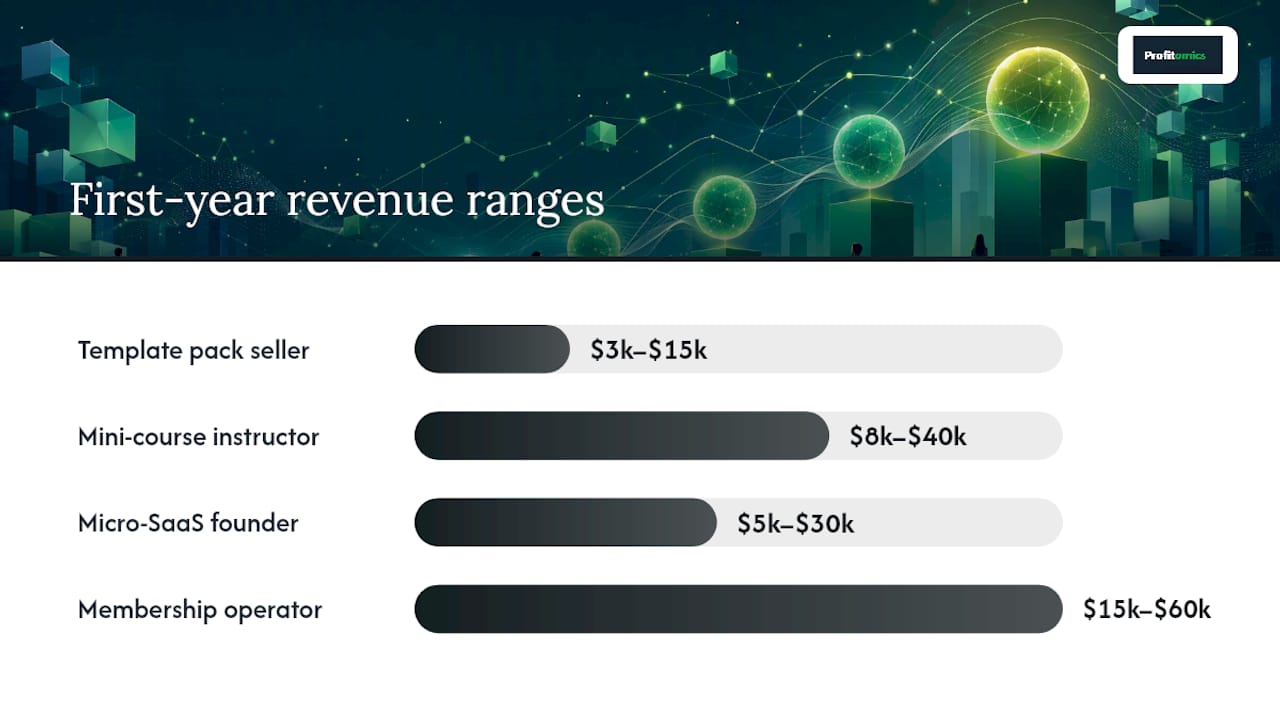
Variance drivers across all four: niche demand, existing audience size, marketing consistency, and how precisely the product is positioned. A creator with 5,000 engaged followers will outperform a creator with 50,000 passive ones at launch.
Which profile fits you?
- Solo creator with limited time: start with templates or a short ebook.
- Agency or consultant: package your existing process as a course or SOP template pack.
- Developer: build a micro-SaaS or plugin for a workflow you already understand.
Your 6-week launch checklist
This checklist moves you from idea to first paying customers in six weeks. Each week has a clear deliverable. Profitomics’s Passive Income Blueprint includes a downloadable version of this framework with companion spreadsheets.
-
Week 1: Research and validation
- Write your positioning sentence (who, outcome, obstacle)
- Run the review-mining exercise on 30–50 competitor reviews
- Build a one-page landing page with an email capture
- Drive 200+ visitors via a small paid test or community post
- Target: 10+ email signups or 1+ presale purchase
-
Week 2: Build your MVP
- Create the minimum version that delivers the core outcome
- For ebooks: complete draft, formatted in Canva or Google Docs
- For templates: functional, tested file with a short instruction guide
- For mini-courses: record modules 1 and 2; outline the rest
- Target: a deliverable you would not be embarrassed to send to a paying customer
-
Week 3: Landing page and email capture
- Write a sales page with a headline, outcome statement, bullet benefits, and a clear price
- Set up your email provider and a three-email welcome sequence
- Create a lead magnet (a free mini-version or related resource)
- Publish two pieces of content addressing your buyer’s main pain point
- Target: 50+ email subscribers before launch
-
Week 4: Presale
- Open a presale at 20–30% off full price with a clear deadline
- Offer a bonus to the first 20 buyers (live Q&A, extra template, early access)
- Email your list and post in three to five relevant communities
- Target: 5–20 presale buyers
-
Week 5: Launch
- Send a three-email launch sequence: announcement, value email, last-chance
- Open at full price
- Collect testimonials from presale buyers and add them to the sales page
- Target: 20–50 total customers by end of week
-
Week 6: Onboarding and social proof
- Set up an automated onboarding email sequence for new buyers
- Follow up with buyers at day 3 and day 7 to collect feedback
- Add three to five testimonials to your sales page
- Plan your first upsell, bundle, or next product
- Target: a sales page that converts at 2%+ from warm traffic
Common traps to avoid:
- Perfecting the product before validating demand
- Skipping the presale and going straight to a full launch
- Building on a platform that does not let you collect customer emails
- Pricing too low out of fear, then struggling to cover marketing costs
Pro Tip: If week 2 feels slow, cut the product scope in half. The goal is a deliverable that solves one problem completely, not a product that addresses every related problem partially. You can always build the sequel.
Where to start if you only have 10 hours a week
Most people reading this are not full-time creators yet. They have a job, a family, or both, and they are trying to build something on the side without burning out. That constraint is actually useful: it forces you to pick the smallest viable product and validate before building, which is exactly the right order.
The honest truth about part-time product creation is that the bottleneck is almost never ideas or skills. It is decision paralysis and scope creep. Creators with 10 hours a week who ship a $47 template in week three will outperform creators with 40 hours a week who are still “refining” their 12-module course in month four.
Prioritization framework for limited time:
- Validate first, always. Do not spend a single hour building until you have at least 10 email signups or one presale.
- Choose the lowest-effort format that still delivers real value: templates, short ebooks, and prompt packs are the right starting point.
- Reuse what you already have. A process you use at work, a spreadsheet you built for yourself, a framework you explain to clients repeatedly — these are products waiting to be packaged.
Recommended product picks for a 10-hour-per-week cadence:
- Notion or Google Sheets template (2–3 weeks to launch)
- Short ebook or guide (3–4 weeks to launch)
- Prompt pack for a specific profession or tool (1–2 weeks to launch)
- Printable planner or tracker (1–2 weeks to launch)
A realistic weekly schedule:
- 2 hours: content creation (one blog post, one social post, or one email)
- 3 hours: product work (writing, designing, or recording)
- 2 hours: marketing and community engagement
- 2 hours: email list management and analytics review
- 1 hour: research and planning for the following week
Micro-products and templates often provide the best return on effort for part-time creators and reliably build an email list for larger launches down the road. Profitomics’s templates are built on exactly this logic: each ebook is scoped to deliver one clear outcome, with companion checklists so you can apply the system without starting from scratch.
Profitomics gives you the framework, not just the idea
Most digital product guides stop at the list. Profitomics goes further. Every ebook in the Profitomics library is built around a specific financial outcome, paired with templates, spreadsheets, and checklists so you can apply the system the same day you read it.
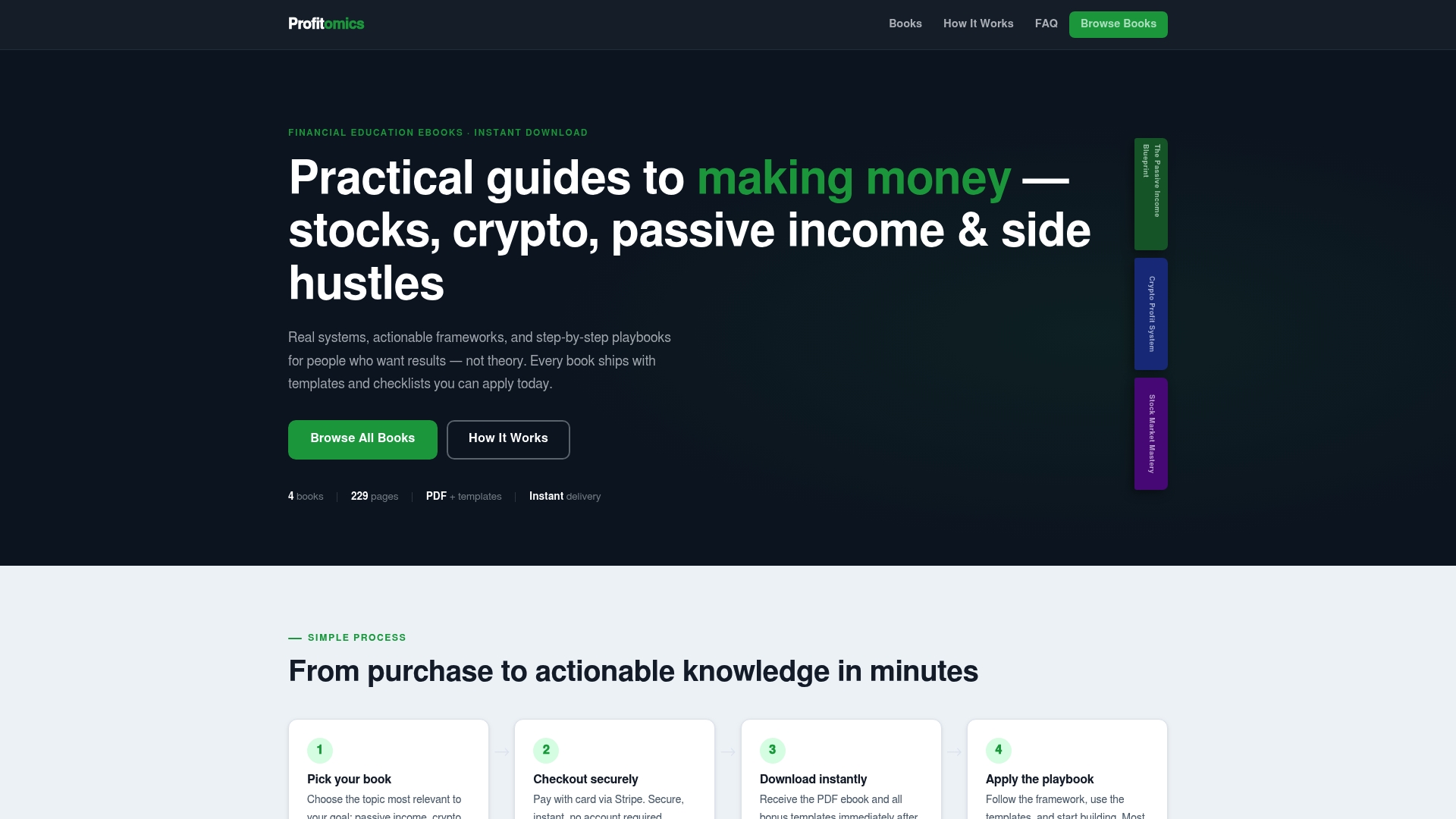
The Passive Income Blueprint is the most direct match for creators working through this guide: it covers building income streams from digital products and online business, and includes the launch checklist and tracking spreadsheets referenced throughout this article. If you are focused on investing alongside your product business, Stock Market Mastery packages swing trading and long-term compounding strategies with the same template-first approach. Both deliver instantly as PDFs with companion bonus materials. Browse the full library at Profitomics and pick the guide that matches your next financial goal.
Sources
- Digital products — Salesforce Commerce
- Online education worldwide — Statista Outlook
- Digital Product Ideas: Find Profitable Pain Gaps With AI — Nick Sasaki
- A million digital product ideas — Adventures in Products